The four ways
The four connections one by one — who is the client, who is the server, and what is fetched.
The same data always flows. The four ways differ in who opens the connection — the client — and who accepts it — the server.
In the diagrams the client side is marked by the red bar, the server by the filled area. The arrows say what is actually fetched.
Manufacturer cloud
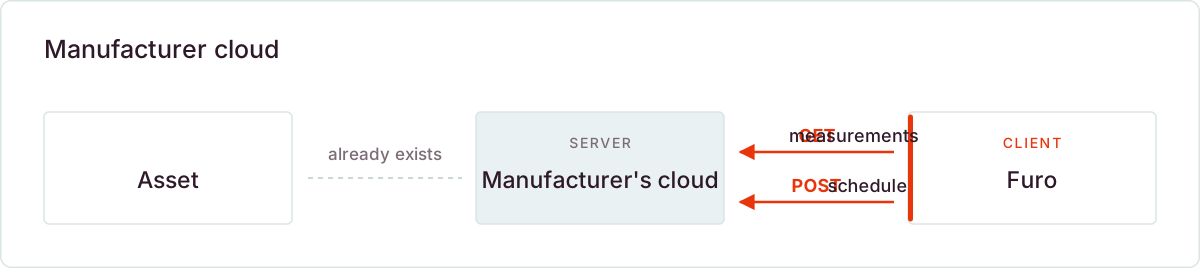
The storage system is already connected to its manufacturer's cloud. Furo signs in there, fetches the measurements and places the schedule. The cloud passes it on to the asset.
Nothing has to be set up at the site — the connection between asset and manufacturer cloud already exists. Furo only needs an account for the manufacturer API, which you create. This is the most common and fastest way.
Controller via broker
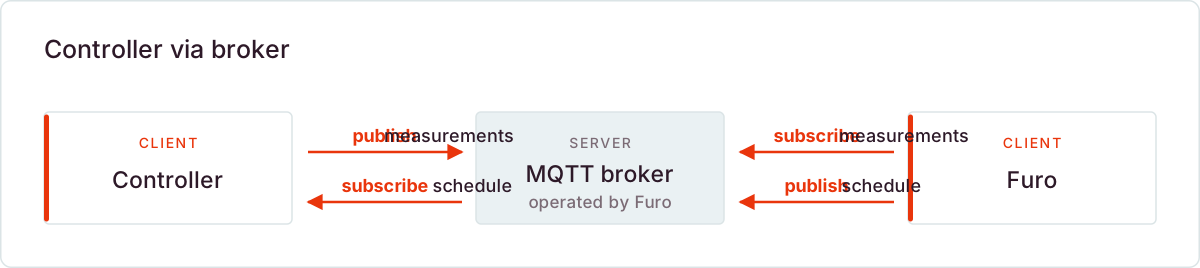
Some controllers can be addressed directly, without a manufacturer cloud. For this Furo operates an exchange, an MQTT broker. Here both sides are clients: controller and Furo connect to the broker, and it delivers the messages.
Instead of polling, messages are sent and subscribed to: the controller publishes its measurements and subscribes to the schedule, Furo exactly the other way round.
Both sides identify themselves with their own certificate, not with a password. Every controller has its own and can only reach its own data — never that of another asset. An outbound connection is all the site needs.
Schedule handover
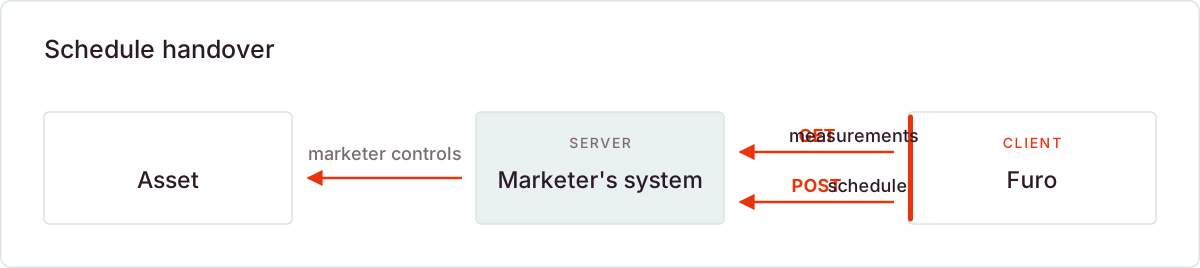
If a direct marketer controls the asset, Furo optimizes and hands the schedule over to their system. Technically Furo is the client as above — the difference lies behind it: the marketer controls the asset itself and is responsible for execution. Nothing has to be set up at the site here either.
Asset as client
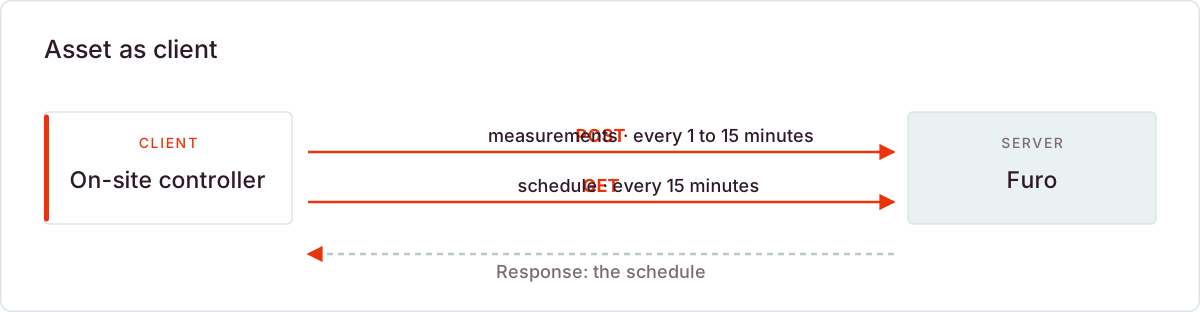
If the control software runs on a server in the customer's network and that server must not be reachable from outside, the roles are reversed: the on-site controller is the client, Furo the server.
It sends the measurements and fetches the schedule — both outbound, both over HTTPS, secured with a key per asset. The schedule comes back as the response to the fetch, so no additional connection from outside is created.
For an IT department this is the least demanding way: no port approval, no port forwarding, no VPN, no service at the site that would be reachable from outside. Because Furo never reaches into the customer network from outside, the question of who is responsible for securing such an access does not arise either.
The effort shifts to the controller instead: it has to execute the schedule itself and have a defined behaviour for when it cannot fetch it. The interface for this is the Telemetry API: it lists the fields, the cadence and how you obtain API key and system ID.